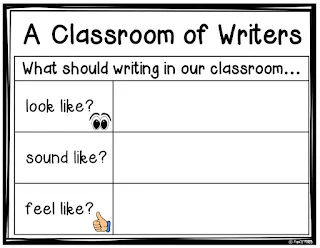
Do your students see themselves as writers? Do they think like writers? What do your students think a classroom of writers should look like? Set the stage for writing by creating an anchor chart with your students. Revisit throughout the year! Click on the image to download a FREE copy.
Some students are natural-born writers, and others are not. Some students LOVE to write, and others do not. In the end, all students should come to understand they ARE indeed writers!
Here are a few ideas that might work for your writer's toolbox:
Observe and Write:
The more information and ideas students have to write about, the more they will write. Activate student observation skills. Webcams are a great way for students to observe animals and places beyond the walls of their classrooms. Students can observe animals such as pandas, penguins, and apes or the Statue of Liberty and then write an informational piece or an opinion piece using the information they observed.
Check out these webcams:
San Diego Zoo-Animal Cams
Statue of Liberty-EarthCam
Check out the site, AirPano.com. Students can see 360-degree aerial panoramic views of over 200 locations on the planet. Let students "travel" to a location and then write about it. Students can convince others to visit a certain location or inform others about an interesting location.
Why are lemons sour? Why are school buses yellow? Wonderopolis is a site where students can find interesting questions and then watch a video and/or read some text to discover the answer. Students then can write an informative piece responding to the question.
Create Lists:
Lists can be a great motivator for reluctant writers. They are short and sweet, yet can be quite helpful to grow young writers. Creating lists can help writers maintain a focus. Given a topic for their lists, students should make sure that all ideas relate to the topic. Writing lists also can help create fluency in student writing. When students are asked to write lists, they can grow their own vocabulary and strengthen word associations. Lists are NOT the end. They are just the beginning. Students can use ideas generated from the lists for future writing tasks.
For example:
Make a list of items needed to make a scarecrow. (future how-to writing piece)
Make a list of fun fall activities. (future narrative piece)
Make a list of ideas you associate with the month of October.
Make a list of things you see mostly in the fall. (future informative piece)
Getting students excited about writing is important. We want our students to play with language and see that writing is connected and relevant to their lives.
Elaboration:
One thing for students to keep in mind is that writing is never REALLY done. Revising is one step in the writing process where students can work to take their writing to the next level. Here is a quick idea to help students add to their writing. You can construct a chart similar to the one below. For each number, you can create different elaboration tasks. When students are "finished" with their writing piece or experience moments of writer's block, students can roll a number cube. Students then can match the roll with the elaboration task from the chart. This particular Roll-a-Cube chart is designed for narrative writing. How might the elaboration tasks change for informational writing? One idea is to have students add a statistic to their writing as evidence. Differentiate based on students' readiness levels.

Variety is the spice of life. By using a variety of ideas to hook and engage writers, we can help to grow young writers. Write on. . .

Some students are natural-born writers, and others are not. Some students LOVE to write, and others do not. In the end, all students should come to understand they ARE indeed writers!
Here are a few ideas that might work for your writer's toolbox:
Observe and Write:
The more information and ideas students have to write about, the more they will write. Activate student observation skills. Webcams are a great way for students to observe animals and places beyond the walls of their classrooms. Students can observe animals such as pandas, penguins, and apes or the Statue of Liberty and then write an informational piece or an opinion piece using the information they observed.
Check out these webcams:
San Diego Zoo-Animal Cams
Statue of Liberty-EarthCam
Check out the site, AirPano.com. Students can see 360-degree aerial panoramic views of over 200 locations on the planet. Let students "travel" to a location and then write about it. Students can convince others to visit a certain location or inform others about an interesting location.
Why are lemons sour? Why are school buses yellow? Wonderopolis is a site where students can find interesting questions and then watch a video and/or read some text to discover the answer. Students then can write an informative piece responding to the question.
Create Lists:
Lists can be a great motivator for reluctant writers. They are short and sweet, yet can be quite helpful to grow young writers. Creating lists can help writers maintain a focus. Given a topic for their lists, students should make sure that all ideas relate to the topic. Writing lists also can help create fluency in student writing. When students are asked to write lists, they can grow their own vocabulary and strengthen word associations. Lists are NOT the end. They are just the beginning. Students can use ideas generated from the lists for future writing tasks.
For example:
Make a list of items needed to make a scarecrow. (future how-to writing piece)
Make a list of fun fall activities. (future narrative piece)
Make a list of ideas you associate with the month of October.
Make a list of things you see mostly in the fall. (future informative piece)
Getting students excited about writing is important. We want our students to play with language and see that writing is connected and relevant to their lives.
Elaboration:
One thing for students to keep in mind is that writing is never REALLY done. Revising is one step in the writing process where students can work to take their writing to the next level. Here is a quick idea to help students add to their writing. You can construct a chart similar to the one below. For each number, you can create different elaboration tasks. When students are "finished" with their writing piece or experience moments of writer's block, students can roll a number cube. Students then can match the roll with the elaboration task from the chart. This particular Roll-a-Cube chart is designed for narrative writing. How might the elaboration tasks change for informational writing? One idea is to have students add a statistic to their writing as evidence. Differentiate based on students' readiness levels.